Recognizing the correct microSD Express label
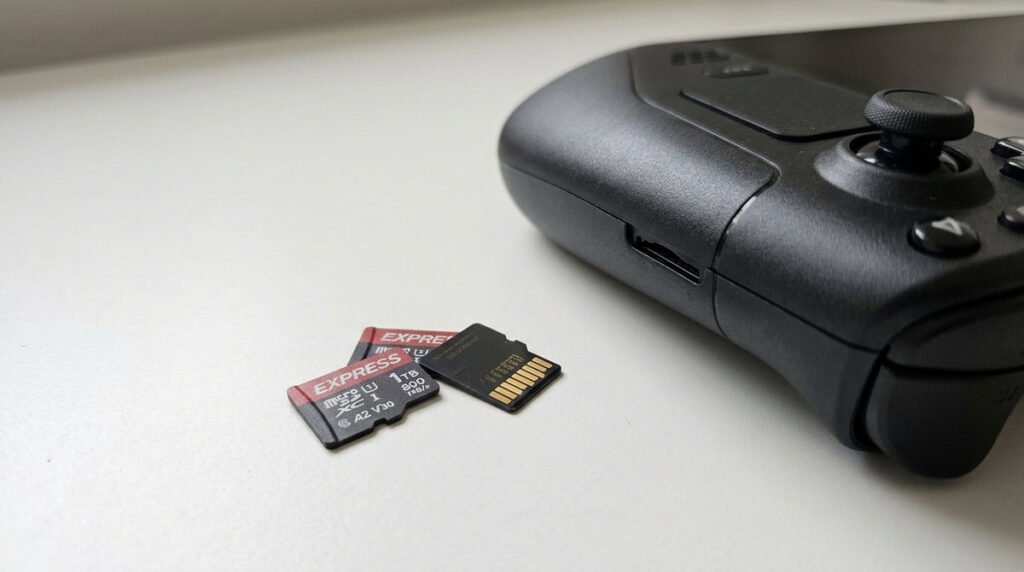
Before ordering a card, photograph the exact product label and look for the microSD EX mark. A listing that says “fast microSD” or advertises a UHS speed class without the Express standard is not sufficient for Switch 2 game storage. The practical comparison is between genuine compatible cards, their usable capacity, the retailer’s returns policy and the games you expect to install. A small reliable card is a better choice than a suspiciously cheap card with an impossible capacity claim.
Compatibility, authenticity and the retailer
The label on the card matters more than a retailer’s headline speed claim. Nintendo Switch 2 requires the microSD Express specification for expanding playable game storage: ordinary microSD cards, even well-regarded high-speed models, are not interchangeable. Check the product packaging, the model number and the seller’s return terms rather than judging compatibility by capacity alone. Counterfeit flash cards sometimes report impossible capacities, so an implausibly low price on a third-party marketplace is a warning sign.
Planning space for a digital game library
Make a simple storage budget before buying: add the installation sizes of your largest digital games, allow room for updates, and decide how often you are willing to archive games. A 256 GB card might be enough for a rotating library but not for a household that wants many large games installed at once. You can normally redownload owned games, but your time and internet limits have a cost too. Do not format a card containing personal data without checking the correct backup and migration instructions.
Card-selection checklist
- Name confusion: microSD Express is different from ordinary microSDXC despite similar physical appearance.
- Authenticity: Use a trusted retailer and keep proof of purchase.
- Capacity: Think in terms of game libraries rather than a single marketing example.
- Performance claims: Peak numbers on listings do not translate into guaranteed load times.
- Warranty: A known manufacturer’s support may matter more than a tiny price difference.
- Formatting: Let the Switch 2 initialize the card where required.
- Moving libraries: Downloaded games can often be reinstalled but saves need separate protection.
- Avoiding false bargains: An implausibly cheap high-capacity card deserves extra scrutiny.